Despite the abnormally long length of this post, it is not meant to be a thorough review of the iPhone 6S - you can find much better ones out there if that's what you're after. Instead, these are my impressions after having used one as my main smartphone for a little less than two weeks. I should explain at the outset that I've been an Android user (and, more specifically, a Nexus phone user) since I acquired the Nexus S back in early 2011. As a tech junkie, though, I've long wanted to experience actually using an iPhone - i.e., more than just reading reviews or holding a friend's. Since I was upgrading from a Nexus 4 to a Nexus 6P this past month, I figured that I could compare the latest and greatest iPhone with the best (or at least purest) of what Android has to offer. This was enabled by Apple's outstanding two-week no-questions-asked no-restocking-fee return policy.
Buying Experience
OK, so this section is not at all about what it's like to use the iPhone. But I'm including it because the experience of going into an Apple store for the first time was striking. It's also where I'll introduce the word that I'm sure to overuse in this write-up: sleek. Everything about Apple is sleek. The store setup is sleek. The products are sleek. The buying process is sleek. The employees are kinda sleek, I guess...maybe that's a stretch.
This was also my first chance to see some of the other new Apple products up close. The MacBook One (really called the MacBook, but I prefer the name that Marco Arment gave it) is *so* slim. And the other MacBooks are equally sleek, if not as thin. And all the Apple Watches looked super nice in the long display case. In general, I was very impressed by how well the store showcased the products. For some reason, though, I didn't look for the new iPad Pro, which I think was probably in store by then.
Anyway, the iPhone 6S that I wanted - unlocked 16 GB in "space gray", mostly because it was the cheapest and I knew this was only a trial anyway - was sold out in the store for the day. The 64 GB was also sold out. I'm not sure why I didn't check for other colors, though, since that aspect of it wasn't super important to me. In any case, that particular model was sold out in all US stores except for Hawaii that day. I found this to be crazy, but the Apple rep said that this was typical - they get almost daily shipments. Add "operations" as another aspect of Apple's business that is super impressive.
In the end, I bought the 16 GB space gray iPhone 6S online after returning home from the store that night. I received it two days later, with free shipping. No biggie.
And when I finished with the phone, I returned it to the Apple Store in person a few days ago. After the (same) rep checked it out briefly (well, he did take it to the back for a couple of minutes), he issued a full refund - no questions asked.
Hardware
My first impression of the i6S was that it was almost too small - in fact I had considered going with the iPhone 6S Plus after handling them in the store. The footprint and screen size (4.7") are about the same as the Nexus 4 that I had just given up, though it was significantly thinner. In comparison, my new N6P is pretty gigantic with its 5.7" screen - definitely bigger than I would ideally want, but manageable. The Samsung Galaxy S6 (and other similarly sized phones) has probably nailed it with 5.2" displays. As for iPhones, the 6S won out over the 5.5" 6S Plus, though I think that one would have worked out just as well. The iPhone was also pretty slippery, but this would not be a long term concern if I were to keep it since I would put in a case; I just had to be extra careful with it for a couple of weeks. Despite my seemingly negative tone here, I should make it clear that the i6S is very nice to hold.
The display on the phone is pretty great. The resolution can't match the N6P (or similar), but the difference is near imperceptible in that regard. The color reproduction seemed no worse on the i6S (except possibly the ever-so-slightly lighter blacks) and the viewing angles were in fact better (though, who's really going to be looking at their screen at 120-plus degrees?).
The vibration motor (aka "Taptic Engine") on the iPhone is really good. It's one of those cases where I don't really get why they came up with a special name for something that already exists, but can kinda understand it because it's a class above everything else out there. The speaker on it is also quite good, despite being bottom-facing. It gets decently loud and has good integrity throughout the frequency range; here, I'm mentally comparing it with the N6P, which has a more desirable front-facing placement but I don't think sounds as good, especially in the bass range. But, again, I don't use phone speakers for much.
General Usage
iOS runs very smoothly on the iPhone 6S. This is not a surprise, as there are tons of benchmarks and anecdotal evidence supporting this, but I'm just saying it again. Apple has done an excellent job of integrating their hardware and software. But I guess this seems especially apparent when "switching" from a 3-year-old Android phone. This is not to say that Android can't run smoothly - my N6P runs quite smoothly as well, and even the N4 only had occasional hiccups despite its age - but there is a certain sleekness about iOS. A sleekness that the comical Google Now launcher on the N6P doesn't quite have.
Despite the polish, the design of the OS is still hit-or-miss for me. While iOS layouts are usually sleeker and allow for more information density, in some cases Material Design (the predominant style in stock Android) is more functional and intuitive.
Some Annoyances
A few minor annoyances also persisted for me in iOS, even after gaining a couple of weeks of experience. One is the default keyboard - I miss being able to long-press some keys on the main keyboard to get quick access to numbers and punctuation while typing a sentence, and instead having to switch to the number/symbol keys and then back to the letters. I also found the autocomplete to be not quite as good, but that's probably being excessively picky (and may also partially be explained by Google's keyboard having more training time/data for me). This is not as big a deal now that iOS allows third party keyboards, but I didn't bother installing one of those during this trial.
Another is the lack of a universal back button. I found that a lot of backwards navigation in iOS is done using items near or at the top of the screen. This actually made the small i6S just as hard to use one-handed as the ginormous N6P, which at least has a back button (mostly) within one-handed reach. I guess I could have used the Reachability feature to get around this, but it didn't seem like a great experience the couple of times I tried it out (you essentially have to do the home button double-tap each time you want to reach something higher on the screen).
Speaking of the home button... Why are there so many freakin' home button actions? Press (with click) to go to Springboard (or first home screen if already on Springboard). Long press for Siri. Double press for app switcher. Double tap (with no click) for Reachability. I guess you eventually get used to it. But still. I would still get it wrong on occassion after two weeks - particularly pressing too long when just trying to unlock the phone.
Some Good Stuff
I'm probably being too negative on the iPhone so far, though - there is a lot to like about using it. Even the home button has some really nice aspects about it. It was nice having the fingerprint sensor on the front of the phone for unlocking it - as opposed to the the N6P which has it on the back. I don't really have a front/back preference for the sensor after I have already picked up the phone (each has its merits; the placement on the back is actually pretty natural for the index finger), but there is definitely a difference when the phone is lying on the table and you want to unlock it without picking it up. It's more of a hassle with the N6P because you need to pick it up to use the fingerprint sensor, unlock it with the passcode/pattern, or hope that it's been kept unlocked by one of the Smart Lock features.
Another aspect where iOS clearly performs better is installing, updating, and uninstalling apps. This is much faster than it is on Android. Same with starting up the phone. These are probably influenced by a few things: much better implementation of hardware-supported encryption on the iPhone; much faster (in single-core tasks) processor; higher performance software architecture (though this is probably less so the case with ART vs Dalvik run-time).
iOS battery management is also pretty amazing, especially when idle. If I leave the iPhone just sitting all day without much/any use (which is standard, especially when I'm at work), it will only lose a few percent of battery at most. I can easily go three days during the work week without charging it. To be fair, Android has caught up a little bit in this regard with the Doze feature in 6.0 Marshmallow, but I think iOS still has the edge here. My N6P can almost get similar idle battery life as the i6S, but only if the phone literally is lying still somewhere - Doze only kicks in if the phone isn't moving; if the phone is in my pocket, the battery usage trend is similar to what it has been with previous versions of Android, and the only benefit over the N4 is the huge battery. During active use, the i6S might come in with slightly less battery life than the N6P, but only because the N6P battery is twice the size. My typical phone usage profile leans more toward idle (more so during the week, less so on weekends) than active, so I generally saw longer battery life with the i6S than N6P. I would expect the larger i6S Plus to have even more amazing battery life. Of course, the aggressive battery management of iOS does have some downsides, which I'll discuss later.
I think 3D Touch (where the phone differentiates actions based on how hard you press the screen) is potentially interesting, after initially thinking it would be a gimmick. Although I didn't make extensive use of it, I found it most useful when peeking at the targets of links or contents of list items. I think app shortcuts (i.e., quick actions made available through a hard press) from the homescreen are also a good use case, though I didn't actually use them. And the way they've synched 3D Touch and the Taptic Engine make it kinda fun to just poke at stuff on the homescreen sometimes. All that being said, I don't see this being some revolutionary interaction model that some reviewers predicted. It makes some things quicker and easier to do, but they are things that you can do without pressure sensitivity. And there's also the minor issue of discoverability - you don't really know what the deep press options are for all the various apps unless you go around deep pressing everything.
Where the Jury is Still Out
Buying Experience
OK, so this section is not at all about what it's like to use the iPhone. But I'm including it because the experience of going into an Apple store for the first time was striking. It's also where I'll introduce the word that I'm sure to overuse in this write-up: sleek. Everything about Apple is sleek. The store setup is sleek. The products are sleek. The buying process is sleek. The employees are kinda sleek, I guess...maybe that's a stretch.
This was also my first chance to see some of the other new Apple products up close. The MacBook One (really called the MacBook, but I prefer the name that Marco Arment gave it) is *so* slim. And the other MacBooks are equally sleek, if not as thin. And all the Apple Watches looked super nice in the long display case. In general, I was very impressed by how well the store showcased the products. For some reason, though, I didn't look for the new iPad Pro, which I think was probably in store by then.
Anyway, the iPhone 6S that I wanted - unlocked 16 GB in "space gray", mostly because it was the cheapest and I knew this was only a trial anyway - was sold out in the store for the day. The 64 GB was also sold out. I'm not sure why I didn't check for other colors, though, since that aspect of it wasn't super important to me. In any case, that particular model was sold out in all US stores except for Hawaii that day. I found this to be crazy, but the Apple rep said that this was typical - they get almost daily shipments. Add "operations" as another aspect of Apple's business that is super impressive.
In the end, I bought the 16 GB space gray iPhone 6S online after returning home from the store that night. I received it two days later, with free shipping. No biggie.
And when I finished with the phone, I returned it to the Apple Store in person a few days ago. After the (same) rep checked it out briefly (well, he did take it to the back for a couple of minutes), he issued a full refund - no questions asked.
Hardware
My first impression of the i6S was that it was almost too small - in fact I had considered going with the iPhone 6S Plus after handling them in the store. The footprint and screen size (4.7") are about the same as the Nexus 4 that I had just given up, though it was significantly thinner. In comparison, my new N6P is pretty gigantic with its 5.7" screen - definitely bigger than I would ideally want, but manageable. The Samsung Galaxy S6 (and other similarly sized phones) has probably nailed it with 5.2" displays. As for iPhones, the 6S won out over the 5.5" 6S Plus, though I think that one would have worked out just as well. The iPhone was also pretty slippery, but this would not be a long term concern if I were to keep it since I would put in a case; I just had to be extra careful with it for a couple of weeks. Despite my seemingly negative tone here, I should make it clear that the i6S is very nice to hold.
The display on the phone is pretty great. The resolution can't match the N6P (or similar), but the difference is near imperceptible in that regard. The color reproduction seemed no worse on the i6S (except possibly the ever-so-slightly lighter blacks) and the viewing angles were in fact better (though, who's really going to be looking at their screen at 120-plus degrees?).
The vibration motor (aka "Taptic Engine") on the iPhone is really good. It's one of those cases where I don't really get why they came up with a special name for something that already exists, but can kinda understand it because it's a class above everything else out there. The speaker on it is also quite good, despite being bottom-facing. It gets decently loud and has good integrity throughout the frequency range; here, I'm mentally comparing it with the N6P, which has a more desirable front-facing placement but I don't think sounds as good, especially in the bass range. But, again, I don't use phone speakers for much.
General Usage
iOS runs very smoothly on the iPhone 6S. This is not a surprise, as there are tons of benchmarks and anecdotal evidence supporting this, but I'm just saying it again. Apple has done an excellent job of integrating their hardware and software. But I guess this seems especially apparent when "switching" from a 3-year-old Android phone. This is not to say that Android can't run smoothly - my N6P runs quite smoothly as well, and even the N4 only had occasional hiccups despite its age - but there is a certain sleekness about iOS. A sleekness that the comical Google Now launcher on the N6P doesn't quite have.
Despite the polish, the design of the OS is still hit-or-miss for me. While iOS layouts are usually sleeker and allow for more information density, in some cases Material Design (the predominant style in stock Android) is more functional and intuitive.
Some Annoyances
A few minor annoyances also persisted for me in iOS, even after gaining a couple of weeks of experience. One is the default keyboard - I miss being able to long-press some keys on the main keyboard to get quick access to numbers and punctuation while typing a sentence, and instead having to switch to the number/symbol keys and then back to the letters. I also found the autocomplete to be not quite as good, but that's probably being excessively picky (and may also partially be explained by Google's keyboard having more training time/data for me). This is not as big a deal now that iOS allows third party keyboards, but I didn't bother installing one of those during this trial.
Another is the lack of a universal back button. I found that a lot of backwards navigation in iOS is done using items near or at the top of the screen. This actually made the small i6S just as hard to use one-handed as the ginormous N6P, which at least has a back button (mostly) within one-handed reach. I guess I could have used the Reachability feature to get around this, but it didn't seem like a great experience the couple of times I tried it out (you essentially have to do the home button double-tap each time you want to reach something higher on the screen).
Speaking of the home button... Why are there so many freakin' home button actions? Press (with click) to go to Springboard (or first home screen if already on Springboard). Long press for Siri. Double press for app switcher. Double tap (with no click) for Reachability. I guess you eventually get used to it. But still. I would still get it wrong on occassion after two weeks - particularly pressing too long when just trying to unlock the phone.
Some Good Stuff
I'm probably being too negative on the iPhone so far, though - there is a lot to like about using it. Even the home button has some really nice aspects about it. It was nice having the fingerprint sensor on the front of the phone for unlocking it - as opposed to the the N6P which has it on the back. I don't really have a front/back preference for the sensor after I have already picked up the phone (each has its merits; the placement on the back is actually pretty natural for the index finger), but there is definitely a difference when the phone is lying on the table and you want to unlock it without picking it up. It's more of a hassle with the N6P because you need to pick it up to use the fingerprint sensor, unlock it with the passcode/pattern, or hope that it's been kept unlocked by one of the Smart Lock features.
Another aspect where iOS clearly performs better is installing, updating, and uninstalling apps. This is much faster than it is on Android. Same with starting up the phone. These are probably influenced by a few things: much better implementation of hardware-supported encryption on the iPhone; much faster (in single-core tasks) processor; higher performance software architecture (though this is probably less so the case with ART vs Dalvik run-time).
iOS battery management is also pretty amazing, especially when idle. If I leave the iPhone just sitting all day without much/any use (which is standard, especially when I'm at work), it will only lose a few percent of battery at most. I can easily go three days during the work week without charging it. To be fair, Android has caught up a little bit in this regard with the Doze feature in 6.0 Marshmallow, but I think iOS still has the edge here. My N6P can almost get similar idle battery life as the i6S, but only if the phone literally is lying still somewhere - Doze only kicks in if the phone isn't moving; if the phone is in my pocket, the battery usage trend is similar to what it has been with previous versions of Android, and the only benefit over the N4 is the huge battery. During active use, the i6S might come in with slightly less battery life than the N6P, but only because the N6P battery is twice the size. My typical phone usage profile leans more toward idle (more so during the week, less so on weekends) than active, so I generally saw longer battery life with the i6S than N6P. I would expect the larger i6S Plus to have even more amazing battery life. Of course, the aggressive battery management of iOS does have some downsides, which I'll discuss later.
I think 3D Touch (where the phone differentiates actions based on how hard you press the screen) is potentially interesting, after initially thinking it would be a gimmick. Although I didn't make extensive use of it, I found it most useful when peeking at the targets of links or contents of list items. I think app shortcuts (i.e., quick actions made available through a hard press) from the homescreen are also a good use case, though I didn't actually use them. And the way they've synched 3D Touch and the Taptic Engine make it kinda fun to just poke at stuff on the homescreen sometimes. All that being said, I don't see this being some revolutionary interaction model that some reviewers predicted. It makes some things quicker and easier to do, but they are things that you can do without pressure sensitivity. And there's also the minor issue of discoverability - you don't really know what the deep press options are for all the various apps unless you go around deep pressing everything.
Where the Jury is Still Out
There are also some things where I haven't quite made up my mind one way or another. The iOS Notification Center is not really as bad as I expected it to be - just mostly different from what I'm used to. I think I prefer the Android method of organizing and dismissing notifications (fewer gestures), but that's not a big deal. I can see merit in having both the Today view and the Notifications view in iOS, though I could not find a good reason to add any widgets in the Today view. Speaking of widgets, I don't think I missed them on the homescreen too terribly on iOS, though I do prefer the option of having them on the homescreen (and in general being able to organize the homescreen however I want) as opposed to being limited to a static grid of icons.
Another thing that I didn't really miss at the time was having a notification light. However, I did appreciate it a little more after switching back to the Nexus; and the fact that the color changes based on which app(s) have a notification make it easier to decide whether to check the phone in the first place.
Going in, I also expected to take issue with how iOS does not allow a user to change the default apps in various categories; Android allows you to change default apps for each use case - e.g., use a different default browser, map, photo viewer, music player, etc. However, this wasn't a big deal for me in practice. And the default apps really aren't that bad. For example, Apple Maps is good enough, though certainly not as good as Google Maps. This doesn't really matter, though, since Google Maps is available on iOS. I had a similar sentiment with the few other defaults where I would prefer non-Apple alternatives. But then again, I didn't do much of opening app links from other apps during my time w/ the iPhone.
I briefly entertained the idea of doing a Siri vs Google Now face-off, but never got around to it (you can find decent comparisons online elsewhere). I did use Siri a little bit just to check it out, and it fared well for the most part. I like that you can essentially have a conversation with Siri, and it keeps the context of the what you previously asked for. In one example that I recall, I asked Siri where the nearest Brown Bear car wash was, then Siri located it and asked me if I wanted to navigate there; I responded "get directions", and Siri opened up Apple Maps and immediately began navigating me there. Google Now can technically do the same thing, but you would have to find and push the button to start navigation after being shown the location (which is more difficult, and arguably less safe, if doing this while driving), instead of being able to reply by voice that this is your intention. I didn't get to experience much of Siri's new proactive features, but I don't see them being anywhere as good as Google Now (even if I had as much usage time with iOS as I have with Google products). This is because Apple (for better or worse) simply does not collect as much of my data and usage patterns as Google does. Google Now has become good enough that I have come to rely on it as part of my regular routine (and while the Google app on iOS provides some of the same functionality, it's not as good, and even buggy at times). I should say, though, that the new Google "Now on Tap" feature on Android is mostly garbage, and I have disabled it on my phone and tablet.
Music
I'm not the first one to say this, but... Apple Music is kind of a mess. But at least I could use Google Play Music on iOS. I did use Apple Music most of the time I had the iPhone, though, just to make sure I gave it a fair shot. Before I get into what I didn't like about it, I should say that it does get the job done in terms of doing what a subscription music service (Spotify being the prime example) should do. And I also didn't listen to Beats One at all, so I didn't consider what some think is a key differentiator for Apple - but I'm not a radio person at all.
My biggest beef with Apple Music, and music on the iPhone in general, is that I can't reliably scrobble my listens to Last.fm. I have been a Last.fm user for several years now, and I still geek out on analyzing my listening habits based on the data it collects. If I can't scrobble the music that I'm listening to, I pretty much don't consider myself as listening to that music. Unfortunately, scrobbling support is very weak on iOS, mostly due to the restrictive OS architecture. Last.fm has essentially abandoned their scrobbling app (it was last updated almost two years ago), and the thing barely even functions. You can get it to scrobble tracks from Apple Music if you open the app and control the music playback through the Scrobbler. But I couldn't get it to scrobble Google Play Music. Even if it's partially due to user error, it's nowhere near as seamless as on Android where the Last.fm app just works its magic in the background - scrobbling from any music app that you choose to use.
My other main issue with Apple Music is the completely unintuitive queue management. But perhaps I think this because I'm a longtime user of Google Play Music. I guess it's workable once you figure out what's going on, but it's still less than ideal. It basically brackets the current track that you're listening to with a history of what you've previously listened to above, and what's next to listen to below. The problem is that adding new music to "What's Next" usually doesn't put it in the order that I think most sane people would expect it to go. Same with trying to skip back to tracks that I previously played - I didn't really understand what was actually going to be played and the future ordering of things.
I also have other minor gripes with the app. It doesn't have many of the navigation shortcuts that GPM now has - e.g., going to artist or album from a song using the three-dot menu; this is forgivable, though, as GPM itself didn't have these in the beginning and was also a bit of a mess back then. Also, the "For You" section had a few decent suggestions for me, but then just kept repeating the suggestions; I think this is partly my fault for not seeding the app with more interests, but it doesn't give them a free pass on the confusing behavior - I would expect it to just give the limited set of suggestions and then stop, instead of repeating them.
Real Limitations
Going into this experiment, there were a few small areas where I expected the design of iOS to limit how I normally like to operate. I mentioned one real limitation earlier - scrobbling with my music player of choice. I already described it, so I won't go into it more here, but it is probably a deal breaker in terms of me switching to iOS in its current state. Not because it is really something that I "need" (let's put this all in first-world perspective - nothing I've discussed here is really a need), but because there is an alternate platform that is able to provide it. To be honest, though, this is just one sample symptom of the open vs closed dichotomy that makes me prefer Android over iOS in general.
Continuing on that theme, I was not able to set up KeePass satisfactorily on iOS. For the unaware, KeePass is a free open source password manager that I use on my PCs and Android devices. In order to provide access to my passwords on all my devices, I sync my (encrypted) password database using Sugarsync (my cloud storage provider of choice due to its ability to sync arbitrary folders on my PC). This normally would all be fine and dandy even on iOS since there are a few KeePass compatible apps on iOS - MiniKeePass was the one I chose based on online recommendations. However, for additional security I also use a keyfile to decrypt my password database - this is an abitrary file that must be provided along with the master password to decrypt the password database. Further, I use a file that is (hopefully) innocent looking, so that an "attacker" would not know to use it as a keyfile (I realize that this post is an op-sec failure in that I have given away my use of a keyfile, but I think that my passwords are still quite reasonably secure). The problem is that iOS does not allow free filesystem access, and so keyfiles must be renamed to a specific extension and imported permanently into MiniKeePass - thus defeating the purpose of having a less-than-obvioius keyfile. You could argue (perhaps successfully) that iOS security in general is strong enough that relying solely on my (pretty strong) master password is good enough. You could also argue that there are other password managers that make synchronization among various devices, including iOS ones, more seamless and provide sufficient security (though they all cost more than my free solution). My reponse to both of those arguments is that they are not the way that I have chosen to do things after a lot of careful consideration. Again, the limitations of iOS do not provide for my desired option.
There are a couple of other meaningful limitations that I came across, though these don't fall in the category of deal breakers. One has to do with how background processing has been curtailed in the quest to limit battery usage. One result of this is that third-party apps that back photos up online (e.g., Sugarsync or Google Photos) usually require you to open them to kick off the syncing process (though it appears that this could possibly also be triggered by location changes). These apps can also only run for a few minutes in the background if you were to switch from them or lock the phone, but that is usually (depending on the number of photos and your Internet connection at the time) more than sufficient time to synchronize everything. In contrast, both of those apps automatically synchronize my photos on Android without any interaction from me (though I should note that one of them is set to only sync when/once WiFi is available). In general, this does not result in a significant degrade of operations in iOS - it only becomes a deal if you somehow lose your phone soon after taking the pictures without having manually triggered a sync. It's also possible that Apple's Photos app is less restricted in terms of background processing/syncing, but I did not give that a try since I don't use iCloud.
An area where I knew going in that iOS was more limited, but ended up being less of a deal, was integration with Google Voice. Despite how much Google has pretty much neglected this free product, I still give out and use my GV number as my primary number especially so that I can be reached by voice or text while at work (where I don't have access to cell service). Android provides better support for GV, even allowing outgoing calls to be placed using GV by default from the dialer app. While GV support on iOS is more limited (calling via my GV number requires using the Click2Call feature which essentially calls the cell phone and then connects to the desired party - i.e., you receive a call to make a call), it was enough to get the job done (both for voice and text) without too much hassle.
I'm not the first one to say this, but... Apple Music is kind of a mess. But at least I could use Google Play Music on iOS. I did use Apple Music most of the time I had the iPhone, though, just to make sure I gave it a fair shot. Before I get into what I didn't like about it, I should say that it does get the job done in terms of doing what a subscription music service (Spotify being the prime example) should do. And I also didn't listen to Beats One at all, so I didn't consider what some think is a key differentiator for Apple - but I'm not a radio person at all.
My biggest beef with Apple Music, and music on the iPhone in general, is that I can't reliably scrobble my listens to Last.fm. I have been a Last.fm user for several years now, and I still geek out on analyzing my listening habits based on the data it collects. If I can't scrobble the music that I'm listening to, I pretty much don't consider myself as listening to that music. Unfortunately, scrobbling support is very weak on iOS, mostly due to the restrictive OS architecture. Last.fm has essentially abandoned their scrobbling app (it was last updated almost two years ago), and the thing barely even functions. You can get it to scrobble tracks from Apple Music if you open the app and control the music playback through the Scrobbler. But I couldn't get it to scrobble Google Play Music. Even if it's partially due to user error, it's nowhere near as seamless as on Android where the Last.fm app just works its magic in the background - scrobbling from any music app that you choose to use.
My other main issue with Apple Music is the completely unintuitive queue management. But perhaps I think this because I'm a longtime user of Google Play Music. I guess it's workable once you figure out what's going on, but it's still less than ideal. It basically brackets the current track that you're listening to with a history of what you've previously listened to above, and what's next to listen to below. The problem is that adding new music to "What's Next" usually doesn't put it in the order that I think most sane people would expect it to go. Same with trying to skip back to tracks that I previously played - I didn't really understand what was actually going to be played and the future ordering of things.
Apple Music
|
GPM on iOS
|
GPM on Android
|

Searching in Apple Music is fine, though provides dynamic results only in text form.
|

Dynamic search results on Google Play Music in iOS includes images.
|

GPM dynamic search results on Android uses the card motif of Material Design.
|

Apple Music search results.
|

GPM on iOS search results.
|

Long pressing the 't' key gives me quick access to the number 5 on Android.
|

Playing from the new Pictureplane album on Apple Music.
|

The "Now Playing" screen on GPM in iOS.
|
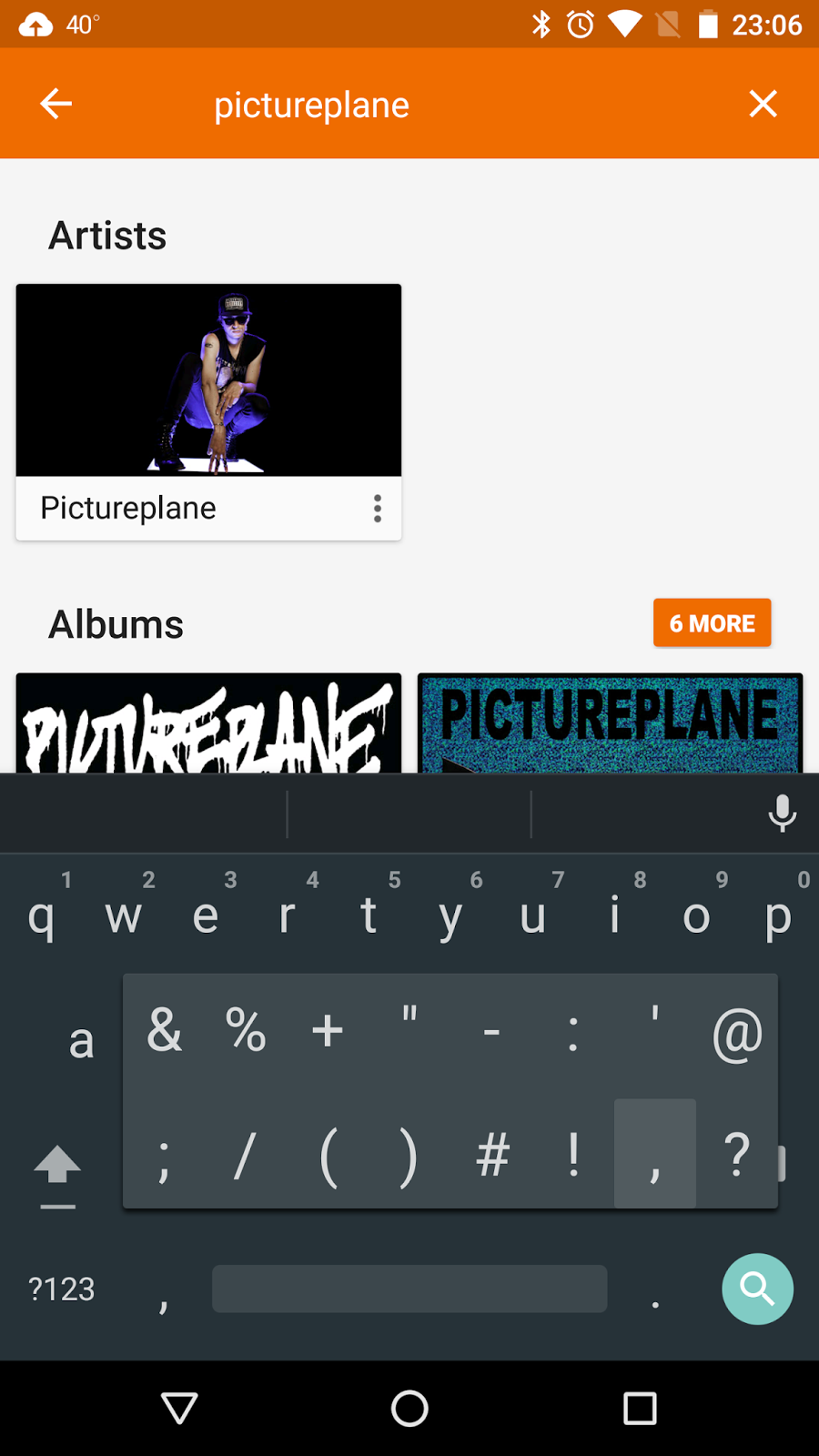
Long pressing the period key gives quick access to other punctuation and symbols on Android.
|

"Play Next" and "Add to Up Next" both did the same thing for me...
|

GPM provides more useful actions from a song or album.
|
|

So there was no way to add songs *after* everything already in Up Next. Hopefully this was just a minor bug.
|

Adding to the queue in GPM puts the songs where you think they should go. Same with "Play Next", if you select that option.
|
I also have other minor gripes with the app. It doesn't have many of the navigation shortcuts that GPM now has - e.g., going to artist or album from a song using the three-dot menu; this is forgivable, though, as GPM itself didn't have these in the beginning and was also a bit of a mess back then. Also, the "For You" section had a few decent suggestions for me, but then just kept repeating the suggestions; I think this is partly my fault for not seeding the app with more interests, but it doesn't give them a free pass on the confusing behavior - I would expect it to just give the limited set of suggestions and then stop, instead of repeating them.
Real Limitations
Going into this experiment, there were a few small areas where I expected the design of iOS to limit how I normally like to operate. I mentioned one real limitation earlier - scrobbling with my music player of choice. I already described it, so I won't go into it more here, but it is probably a deal breaker in terms of me switching to iOS in its current state. Not because it is really something that I "need" (let's put this all in first-world perspective - nothing I've discussed here is really a need), but because there is an alternate platform that is able to provide it. To be honest, though, this is just one sample symptom of the open vs closed dichotomy that makes me prefer Android over iOS in general.
Continuing on that theme, I was not able to set up KeePass satisfactorily on iOS. For the unaware, KeePass is a free open source password manager that I use on my PCs and Android devices. In order to provide access to my passwords on all my devices, I sync my (encrypted) password database using Sugarsync (my cloud storage provider of choice due to its ability to sync arbitrary folders on my PC). This normally would all be fine and dandy even on iOS since there are a few KeePass compatible apps on iOS - MiniKeePass was the one I chose based on online recommendations. However, for additional security I also use a keyfile to decrypt my password database - this is an abitrary file that must be provided along with the master password to decrypt the password database. Further, I use a file that is (hopefully) innocent looking, so that an "attacker" would not know to use it as a keyfile (I realize that this post is an op-sec failure in that I have given away my use of a keyfile, but I think that my passwords are still quite reasonably secure). The problem is that iOS does not allow free filesystem access, and so keyfiles must be renamed to a specific extension and imported permanently into MiniKeePass - thus defeating the purpose of having a less-than-obvioius keyfile. You could argue (perhaps successfully) that iOS security in general is strong enough that relying solely on my (pretty strong) master password is good enough. You could also argue that there are other password managers that make synchronization among various devices, including iOS ones, more seamless and provide sufficient security (though they all cost more than my free solution). My reponse to both of those arguments is that they are not the way that I have chosen to do things after a lot of careful consideration. Again, the limitations of iOS do not provide for my desired option.
There are a couple of other meaningful limitations that I came across, though these don't fall in the category of deal breakers. One has to do with how background processing has been curtailed in the quest to limit battery usage. One result of this is that third-party apps that back photos up online (e.g., Sugarsync or Google Photos) usually require you to open them to kick off the syncing process (though it appears that this could possibly also be triggered by location changes). These apps can also only run for a few minutes in the background if you were to switch from them or lock the phone, but that is usually (depending on the number of photos and your Internet connection at the time) more than sufficient time to synchronize everything. In contrast, both of those apps automatically synchronize my photos on Android without any interaction from me (though I should note that one of them is set to only sync when/once WiFi is available). In general, this does not result in a significant degrade of operations in iOS - it only becomes a deal if you somehow lose your phone soon after taking the pictures without having manually triggered a sync. It's also possible that Apple's Photos app is less restricted in terms of background processing/syncing, but I did not give that a try since I don't use iCloud.
An area where I knew going in that iOS was more limited, but ended up being less of a deal, was integration with Google Voice. Despite how much Google has pretty much neglected this free product, I still give out and use my GV number as my primary number especially so that I can be reached by voice or text while at work (where I don't have access to cell service). Android provides better support for GV, even allowing outgoing calls to be placed using GV by default from the dialer app. While GV support on iOS is more limited (calling via my GV number requires using the Click2Call feature which essentially calls the cell phone and then connects to the desired party - i.e., you receive a call to make a call), it was enough to get the job done (both for voice and text) without too much hassle.
Lastly, iOS does not really allow an equivalent task automation framework like you find with Tasker on Android. While I don't go nuts with Tasker like some other people have, I do have at least one pretty useful recipe that reads my texts aloud to me if I receive them while driving - it fires when I receive a text and am connected to the Bluetooth audio access point in my car, and uses Android's notification access architecture to determine if the notification is a received text message, and then converts the text to speech. This type of thing isn't possible on iOS. But it's also not really something that I can't "live" without.
Camera
The last area where I thought it would be interesting to evaluate the iPhone was its camera performance. I will point out before this that there are better (and more scientific) camera comparisons out there, but I just wanted to test things out briefly with a few shots inside my apartment. I am including a few side-by-side comparisons between the i6S and the N6P, but my general takeaway is agreement with previous reviewers that the Nexus phones finally have a camera that can compete with iPhones. Keep in mind that this version of the iPhone does not include optical image stabilization, a feature which is present in the iPhone 6S Plus; this probably would only significantly impact video and low light photos. Some more notes:
Summary and Conclusions
At the end of the day, this little experiment mostly confirmed my suspicions: I think I could be pretty happy with an iPhone, but Android is more my style. This is especially true now that the Nexus phones have addressed 3 of the biggest weaknesses of previous editions that caused me to consider other options: battery, camera, and app permissions. Most people, though, don't have my fairly niche desires; so I can certainly understand why an iPhone would be the best option for them.
Camera
The last area where I thought it would be interesting to evaluate the iPhone was its camera performance. I will point out before this that there are better (and more scientific) camera comparisons out there, but I just wanted to test things out briefly with a few shots inside my apartment. I am including a few side-by-side comparisons between the i6S and the N6P, but my general takeaway is agreement with previous reviewers that the Nexus phones finally have a camera that can compete with iPhones. Keep in mind that this version of the iPhone does not include optical image stabilization, a feature which is present in the iPhone 6S Plus; this probably would only significantly impact video and low light photos. Some more notes:
- The i6S photos usually produces more accurate colors and slightly better focus in a couple of scenes; the N6P photo colors are usually warmer and more saturated (especially when Auto HDR+ kicks in).
- Speaking of Auto HDR+, it can sometimes make getting the shot pretty slow (but not unbearably so) on the N6P. I don't really notice a lag when Auto HDR is active on the i6S.
- The N6P wins in low light photos.
- The N6P at times produced more detail in photos (especially at full zoom), even though both are ~12 MP sensors; however, the N6P photos were also noisier sometimes. Overall, the i6S was probably more consistent.
- Panoramas are probably a little better on the i6S, which creates them from a continuous exposure, as opposed to stitching together discrete photos like the Google Camera app does.
- The i6S looked to be the winner in brief video testing.
- The N6P appears to have more flickering issues than the i6S with slow motion video in artificial light.
iPhone 6S
|
Nexus 6P
|
 |
 |
 |
 |
 |
 |
 |
 |
 |
 |
 |
 |
Summary and Conclusions
Here's a quick way to summarize the ramblings above:
- 90% of the stuff that I want to do on a phone, I can do just as well (or in a few cases better) on an iPhone as I could do on an Android/Nexus phone. Most of the hardware and operating system features are similar enough that the minor differences amount to mostly a matter of taste. And most apps that I care about are available and do mostly the same thing on both platforms.
- 9% of the things I want to do I can't do quite the way that I want on an iPhone, but there's some way of getting the job done. This might require getting a third party keyboard, altering the way that I sync passwords, semi-manually syncing photos, or some other such workaround.
- 1% of stuff there's just no good way for me to do on an iPhone. Scrobbling and task automation fall into this category.
At the end of the day, this little experiment mostly confirmed my suspicions: I think I could be pretty happy with an iPhone, but Android is more my style. This is especially true now that the Nexus phones have addressed 3 of the biggest weaknesses of previous editions that caused me to consider other options: battery, camera, and app permissions. Most people, though, don't have my fairly niche desires; so I can certainly understand why an iPhone would be the best option for them.




 Posts
Posts

